

Use Google’s Dart language calling Firebase database & Riverpod to create Gemini apps on iOS, Android, SPAs, PWAs







Overview
- Popularity vs Competitors
- Architectural Deep Dive
- what?
- Sample Flutter apps
- Smart Phone features in apps
- Get Social
- Dev Project Rolls Costs
- Professional Certifications
- Cloud-based IDE Tutorial
- Tutorial1
- Install for local Development on MacOS
- Create locally step-by-step
- Testing mobile apps
- Agentic Vertex AI
- SVG & Icon Fonts
- Graphically Design using Figma
- E-commerce
- UI Widgets
- Smart Phone app features
- Database
- Web apps
- Calls to APIs
- Google’s Firebase Backend
- Resources
- Jobs
Flutter offers a single codebase to build applications that run across many platforms:
- Desktop apps on Windows, Mac, Linux
- Mobile (smart phone) apps on Google Android vs. Java
- Mobile (smart phone) apps on Apple iOS vs. Swift programming
- PWAs (Progressive Web Apps) and stand-alone SPAs (Single Page Apps such as products) on internet browsers
This is a complicated and difficult business because different technologies are used on each platform:
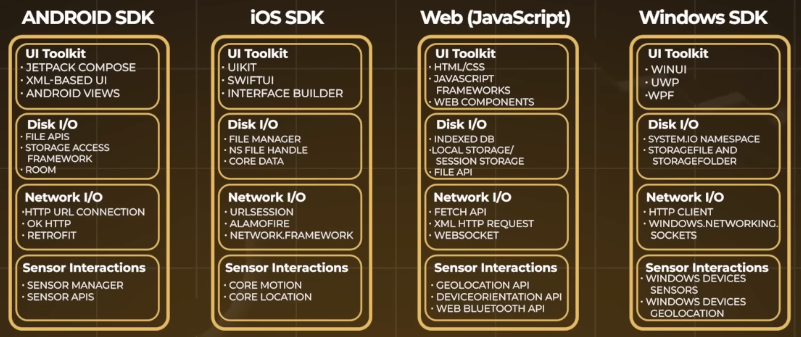
iPhone and Android smart phones have more hardware than PC laptops:
- Camera to take pictures (QR codes)
- Audio (music app Topline by Abbey Road Studios)
- Location (GPS)
- Bluetooth to headphones and speakers
- NFC
- Sensors
But building with Flutter enables cross-device communication: control a browser from a phone app, or controllwhat plays on your TV from your phone. Play music on one device and controls the music on another.
CAUTION: Flutter is not as convenient to build for text-rich presentations on the web as static web page generators such as Jerkyll for github.io websites.
Popularity vs Competitors
From v1.0 in 2017, the Flutter framework now has the largest share (and growing) in the cross-platform app development services market:
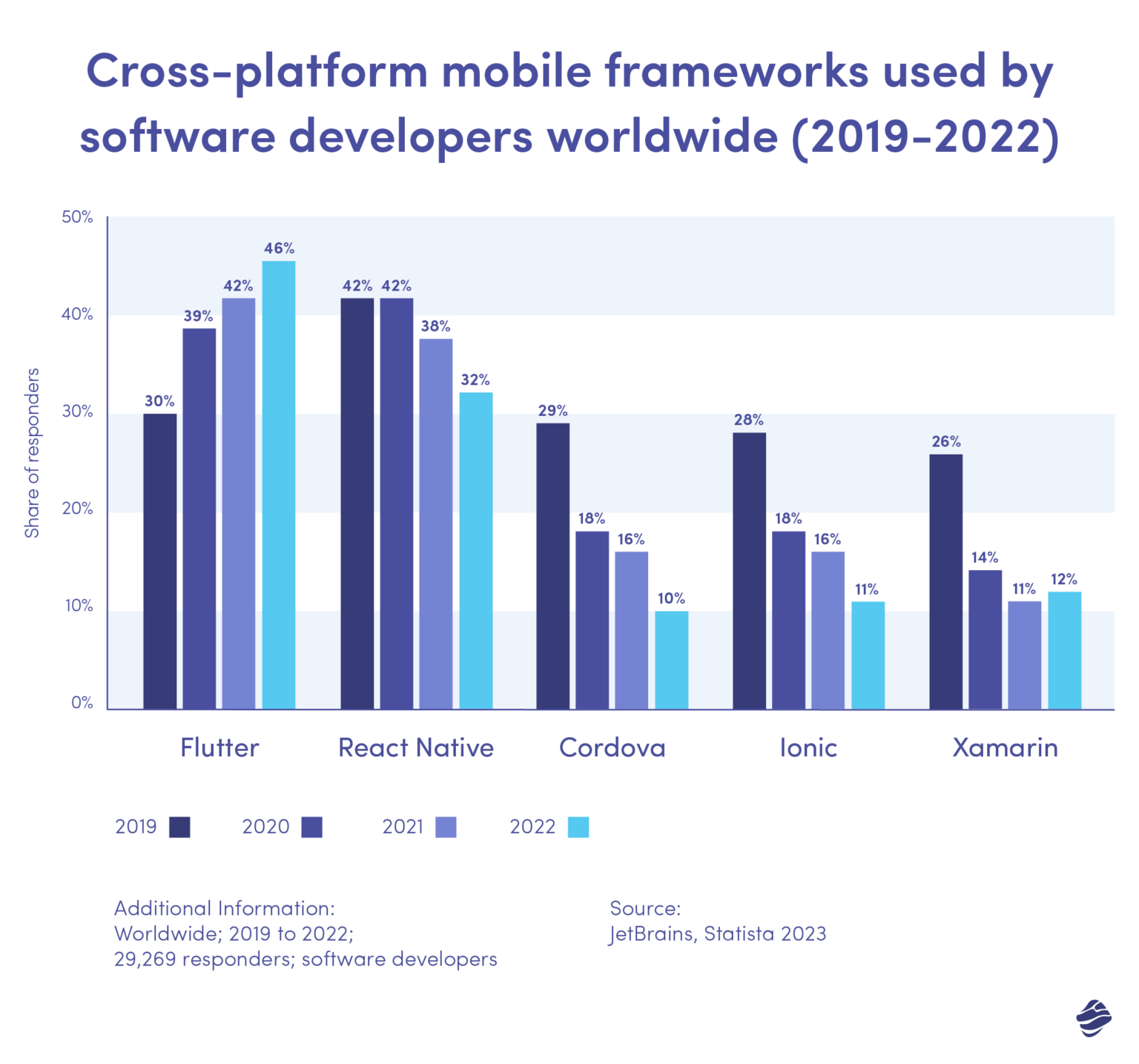
- The JetBrains State of the Developer Ecosystem survey, Flutter has been the most used multi-platform app framework, since 2021.
- App intelligence provider AppTopia reports that, in 2024, Flutter accounts for nearly 30% of all new free iOS apps.
- VIDEO: Flutter vs. React native by @RomanJustCodes
React Native (from Facebook/Meta) is based on the open JavaScript language, which more front-end (web) developers know.
It’s more difficult and expensive to hire and retain a developer to write native SwiftUI code on iPhones and Jetpack Compose code on Androids.
Despite the technical aspects, in the US, there seems to be a lot more jobs in Native Android coding than cross-platform:
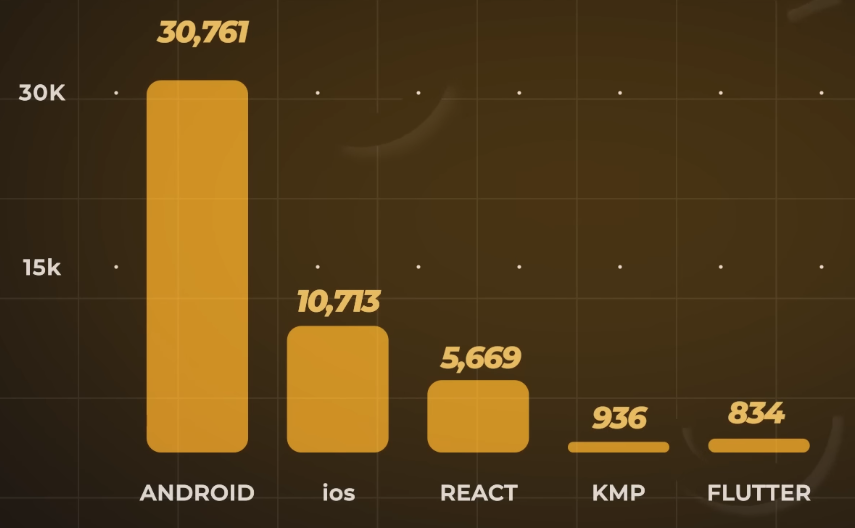
WARNING: In 2019 Google also partnered with IDE developer JetBrains and made their Kotlin language (based on Java) the official language for Android JetPack Compose development. They then created the Kotlin Multiplatform (KMP) for sharing business logic between Android and iOS. This has resulted in rumors of Google dropping Flutter like it has hundreds of their other offerings.
BEWARE: Multi-platform frameworks will always lag behind changes on native platforms. So Apple’s Liquid Glass UI cloud kill cause more testing effort.
PROTIP: The amazing advance of vibe coding (on Claude Code, etc.) may make intermediate platforms irrelevant. But will AI be able to create complex apps? Those new to development may find debugging of KMP easier than native code.
Architectural Deep Dive
Reactive Native uses a “JavaScript Bridge” JNI to iOS on its V8 Engine, so VIDEO: it doesn’t do smooth auto scrolling on iPhones, according to a benchmark.
Flutter’s Dart compiler has both a Dart VM with just-in-time (JIT) compilation and an ahead-of-time (AOT) to produce machine code native device code. VIDEO: However, the APK file loaded on Android from Flutter and React Native are 2x the 6 MB from native-produced. Since 2022, React Native includes in downloads to the app its Hermes JavaScript engine.
VIDEO Nevertheless, amazingly, Flutter is 2X faster than Native on the Time to Full Display (TTFD) load.
VIDEO Flutter takes almost double the graphics memory than Android native code. This may not matter since modern mobile devices have a lot of memory.
VIDEO: Flutter renders basic animations at 120 frames-per-second, on par with Android native, but faster than 51 by KMP & 96 by React Native.
what?
-
HANDS-ON: Firebase Cross Device Codelab The Presence API on Firebase’s Realtime Database (RTDB) enables apps that let users see their device online/offline status. Use it with the Firebase Installations Service to track and connect all the devices where the same user has signed in.
Get the music player app starter code:
git clone https://github.com/FirebaseExtended/cross-device-controller.git
 cd cross-device-controller/starter_code
 flutter pub get
Sample Flutter apps
- https://flutter.dev/showcase
- https://github.com/fluttergems/awesome-open-source-flutter-apps
-
https://appgallery.io/
-
https://appgallery.io/walidashik
-
GE Appliances uses Flutter to display UIs on small LCD screens found on modern appliances.
- CodeCanyon.net’s Flutter Full Applications, some with live preview.
- Xianyu (Alibaba) and Tencent QQ is big in China
- Hamilton Musical app
- Google Ads
- Groupon
- Ebay & Ebay Motors
- New York Times
- BMW, Toyota
- Phillips Hue
- https://goodhabitz.com/
- 25 Top Apps Made with Flutter
- Selection Criteria for Top Apps: What makes an app not just good, but great?
- Detailed Descriptions of Selected Apps: A close look at apps that are turning heads.
- Flutter’s Advantages in App Development: Why Flutter is the go-to for developers.
- Flutter’s Impact on Business Outcomes: How Flutter is rewriting the rules of business efficiency.
- Flutter vs. Other Platforms: A side-by-side comparison with its contemporaries.
-
https://apps.apple.com/us/app/kodebook-notes-upgraded/id6739565636 KodeBook: Notes, upgraded by Mustaq Sameer at https://kodebook.io
- https://kobe.io/ = Kobe Apps, a mobile app SaaS Platform built in Flutter, to design and build a proof of concept, in English and Portugese.
Smart Phone features in apps
PROTIP: The biggest benefit to using Flutter instead of native languages (such as Swift for iOS) is that no user action is needed to update the app. However, this “Hot Reload” causes a little delay for Flutter users as code is updated.
Over the years, developers have grown weary of “Write Once, Work Everywhere” promises from Microsoft Xamarin, Cordova, Kivy, Kendo, PhoneGap, Unity, Ionic, Capacitor, etc.
Google’s “Material” and Apple’s “Capistrano” design systems have fundamentally conflicting design UI standards.
-
Flutter is free and open sourced by Google at:
-
REMEMBER: https://dart.dev/resources/glossary
- “Bottom type” is a type that has no values and is a subtype of all other types.
- Closurization = The process of turning a method or function into a closure.
- Code asset = Compiled native code that is bundled with a Dart app using a build hook and can be used through dart:ffi.
-
Documentation
Ecosystem APIs
Using Flutter means adopting Google’s entire ecosystem, which includes the Dart language code Google invented.
-
API reference is at https://api.flutter.dev. Actions on Google Console
Developing using Flutter involves mastering several technologies within Google’s development ecosystem:
- Google’s Dart language
- Android
- ARCore
- ChromeOS
- Firebase database & console
- Flutter (this page)
- Google Assistant
- Google Cloud
- Google Maps Platform
- Google Pay & Google Wallet
- Google Play console
- TensorFlow
Other Google services:
- AdMob
- AlloyDB
- analytics
- Android TV
- Assistant
- Cast
- Cloud Key Management Service (KMS)
- Cloud Run
- Cloud SQL
- GKE Enterprise
- ML Kit
- Google Workspace (Gmail)
- TensorFlow
- Wear OS
Get Social
https://flutter.dev/ecosystem
-
Follow:
https://blog.flutter.dev articles on Medium.com where new releases are explained with images.
-
Subscribe:
https://www.youtube.com/@flutterdev
https://www.reddit.com/r/FlutterDev/ for trolls
https://developers.google.com/community/experts if you are an expert already, like Marcus Twichel at Billings, United States
-
Sign up for the Flutter Community Forum:
https://forum.itsallwidgets.com/latest
PROTIP: Save the account name and password to your Password Manager.
-
Join the official Discord channel (and complete the intro) at https://discord.com/invite/ht477J5PyH
https://github.com/flutter/flutter/blob/master/docs/contributing/Chat.md
-
Join Premium (for $24.99/monrh):
https://developers.google.com/program/plans-and-pricing
Dev Project Rolls Costs
Online calculators like Estimate My App and Cleveroad help users calculate upfront costs of development by a team that consists of:
- Product owner – oversees app creation and serves as the link between the project team and organization.
- Project manager – manages project progression, ensuring timely and on-budget delivery.
- Business analyst – analyzes the project requirements to ensure it meets business goals.
- UI designer – creates user experience, ensuring an attractive and user-friendly app.
- Flutter app developers – build the application.
- Quality Assurance specialists – test the app to ensure it meets project requirements.
Practical Flutter Architecture (PFA) by Thomas Burkhart: MVC, MVU, MVVM, RVMS (Reactive View Manager Services), PFA.
Professional Certifications
https://developers.google.com/certification/associate-android-developer has been retired.
Popular content creator are Google Experts:
https://cloud.google.com/learn/certification/cloud-architect Google Professional Cloud Architect certification ?
https://androidatc.com/pages/Eng/Flutter-Certified-Application-Developer
https://www.youtube.com/watch?v=xWV71C2kp38
Cloud-based IDE Tutorial
-
Install FlutterLab (Flutter Development course) by Hrishi Suthar for $3.9 on Android and on iPhones provides a wealth of information. But the free version has annoying pop-ups.
-
Install Flutter Tips (from Andrea Bizotto) on Android and on iPhones
-
See list of Google’s tutorials at https://www.skills.google/catalog?keywords=flutter
-
Create your first app at Google Skills Tutorial below
-
https://www.geeksforgeeks.org/flutter/creating-a-simple-application-in-flutter/ 13 Mar, 2025
-
https://learning.oreilly.com/course/learn-flutter-and/9781805122029/ 30-hour video course May 2023 by Maximilian Schwarzmüller from Germany (https://maximilian-schwarzmueller.com/)
-
Animations in Flutter - a developer’s guide: Automated Carousel, Parallax effect, Animated button, Bouncing View, Animated Wave, Instagram Story.
-
https://learning.oreilly.com/library/view/-/9781098154752/
Tutorial1
Follow the steps below for my enhancements to steps (Nov 7, 2024 edition) at “Flutter Development” (GSP885) 1.5-hour hands-on course.
- Install Chrome browser (after brew install google-chrome).
-
Start Lab. Click the IDE.
-
Click the three dots at the upper-right and select “New Incognito Window” to avoid conflicts with cookies.
- Copy this url: https://console.cloud.google.com/
- Press command + ` to switch to the Lab window.
- Scroll down to click the icon to copy the Username, such as student-03-2e9edc111c72@qwiklabs.net
-
Switch to the incognito window and paste the Email.
- Switch to the Lab window.
- Scroll down to click the icon to copy the Password, such as student-03-2e9edc111c72@qwiklabs.net
- Switch to the incognito window. Click “Enter the Password” and paste.
- Click “I understand”, then check under “Terms of Service”, “Agree and continue”.
- Click “Create or select a project”.
-
Notice: Project number: 1030115194620 Project ID: qwiklabs-resources
If using VSCode IDE, search for “Flutter: New Project”.
- Click the Cloud Shell icon at the upper-right corner. Click Continue.
- Click Authorize to see lines like this:
 Welcome to Cloud Shell! Type "help" to get started, or type "gemini" to try prompting with Gemini CLI.
 Your Cloud Platform project in this session is set to qwiklabs-resources.
 Use `gcloud config set project [PROJECT_ID]` to change to a different project.
 student_03_2e9edc111c72@cloudshell:~ (qwiklabs-resources)$
Task 1: Open the Code Server editor
In this lab, we will use a custom editor that includes the Flutter and Dart extensions.
- Switch to the Lab window.
- Click the copy icon for IDE.
-
Switch to the incognito window and paste the URL
Task 2. Create Flutter template “first_app”
- Switch to the IDE window.
- REMEMBER: Click control + shift + ` or click the menu at the upper-left to select “Terminal”.
- Copy and paste for the “Welcome”
flutter create first_appThe name should be all lowercase, with underscores to separate words, “just_like_this”.Use only basic Latin letters and Arabic digits: [a-z0-9_].
``` Creating project first_app… Resolving dependencies in
first_app… (1.1s) Downloading packages… Got dependencies infirst_app. Wrote 129 files.
All done! You can find general documentation for Flutter at: https://docs.flutter.dev/ Detailed API documentation is available at: https://api.flutter.dev/ If you prefer video documentation, consider: https://www.youtube.com/c/flutterdev
In order to run your application, type:
$ cd first_app $ flutter run
Your application code is in first_app/lib/main.dart.
1. View the flutter app's commands: <pre>flutter</pre>
Manage your Flutter app development.
Common commands:
flutter create
flutter run [options] Run your Flutter application on an attached device or in an emulator.
Usage: flutter
Global options: -h, –help Print this usage information. -v, –verbose Noisy logging, including all shell commands executed. If used with “–help”, shows hidden options. If used with “flutter doctor”, shows additional diagnostic information. (Use “-vv” to force verbose logging in those cases.) -d, –device-id Target device id or name (prefixes allowed). –version Reports the version of this tool. –enable-analytics Enable telemetry reporting each time a flutter or dart command runs. –disable-analytics Disable telemetry reporting each time a flutter or dart command runs, until it is re-enabled. –suppress-analytics Suppress analytics reporting for the current CLI invocation.
Available commands:
Flutter SDK bash-completion Output command line shell completion setup scripts. channel List or switch Flutter channels. config Configure Flutter settings. doctor Show information about the installed tooling. downgrade Downgrade Flutter to the last active version for the current channel. precache Populate the Flutter tool’s cache of binary artifacts. upgrade Upgrade your copy of Flutter.
Project analyze Analyze the project’s Dart code. assemble Assemble and build Flutter resources. build Build an executable app or install bundle. clean Delete the build/ and .dart_tool/ directories. create Create a new Flutter project. drive Run integration tests for the project on an attached device or emulator. gen-l10n Generate localizations for the current project. pub Commands for managing Flutter packages. run Run your Flutter app on an attached device. test Run Flutter unit tests for the current project.
Tools & Devices attach Attach to a running app. custom-devices List, reset, add and delete custom devices. devices List all connected devices. emulators List, launch and create emulators. install Install a Flutter app on an attached device. logs Show log output for running Flutter apps. screenshot Take a screenshot from a connected device. symbolize Symbolize a stack trace from an AOT-compiled Flutter app.
Run “flutter help
1. To disable reporting of telemetry, run this terminal command:
    <pre>flutter --disable-analytics</pre>

1. Navigate to the app's folder and run:
   <pre>cd first_app; flutter run</pre>
Connected devices:
Linux (desktop) • linux  • linux-x64      • Debian GNU/Linux 11 (bullseye) 5.10.0-30-cloud-amd64
Chrome (web)    • chrome • web-javascript • Google Chrome 126.0.6478.61
[1]: Linux (linux)
[2]: Chrome (chrome)
Please choose one (or "q" to quit):     ```    ### Task 3. Exploring the Flutter code
- Click the folder icon at the upper-left of the IDE window.
- Click “Open Folder” at /home/ide-dev/.
- Select “first_app” to see its folders.
- Click “OK” to see its files and folders:
-
Click file pubspec.yaml to view it on the right-side pane.
Task 4. Running the Flutter web application
- REMEMBER: Click control + shift + ` or click the menu at the upper-left to select “Terminal”.
- REMEMBER: Set the directory to first_app:
fwr
Launching lib/main.dart on Web Server in debug mode... Waiting for connection from debug service on Web Server... 25.5s lib/main.dart is being served at http://0.0.0.0:8080 The web-server device requires the Dart Debug Chrome extension for debugging. Consider using the Chrome or Edge devices for an improved development workflow. 🔥 To hot restart changes while running, press "r" or "R". For a more detailed help message, press "h". To quit, press "q". -
Type R (for “r”) to reload, waiting until “Recompile” message appears.
-
Click “Open in Browser” pop-up at the lower-right to open a URL such as: https://ide-service-6rqup7ut6q-uk.a.run.app/proxy/8080/
- Click Command+` to switch to the Lab window.
 </a>
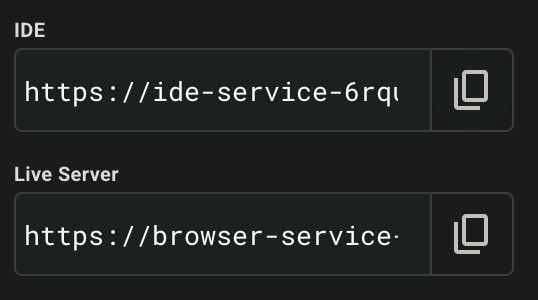
</a> - Click the copy icon for “Live Server” at the left panel.
- Click the “+” at the top to start another incognito window.
- Switch to the incognito window and paste the URL. Rendering of the web application can take up to ten seconds. The view will show the application based on the code in the editor.
- Right-click to select “View Page Source”. REMEMBER: Instead of a lot of HTML, when the flutter_bootstrap.js file loads, it looks into manifest.json to know what else to load:
<link rel="manifest" href="manifest.json">
</head>
<body>
<script src="flutter_bootstrap.js" async></script>
</body>
That is called “Hot Reload”.
Task 5. Flutter Hot reload lib/main.dart
- In the EXPLORER menu click “lib”, then “main.dart”.
-
Mouse over the separator above the Terminal panel and drag it down.
IMPORTANT: Leave a line exposed so you can easily type R (“r”) to Reload (even though the instruction is no longer visible.
- Press “Esc” to enter Edit mode, because this is VIM.
-
Click to highlight Flutter Demo and type in its place Flutter is awesome
-
REMEMBER: Click control + shift + ` or click the menu at the upper-left to select “Terminal”.
- Switch to the browser tab displaying “https://browser-service-6rqup7ut6q-uk.a.run.app/
-
Press CTRL+R to reload the page
- Click control + shift + ` or click the menu at the upper-left to select “Terminal”.
- Click “End Lab”.
- Close the Incognito browser window and Google Skills web page.
Google’s Dart language
-
Confirm the version of the Dart language installed.
3.10 released on: November 12, 2025
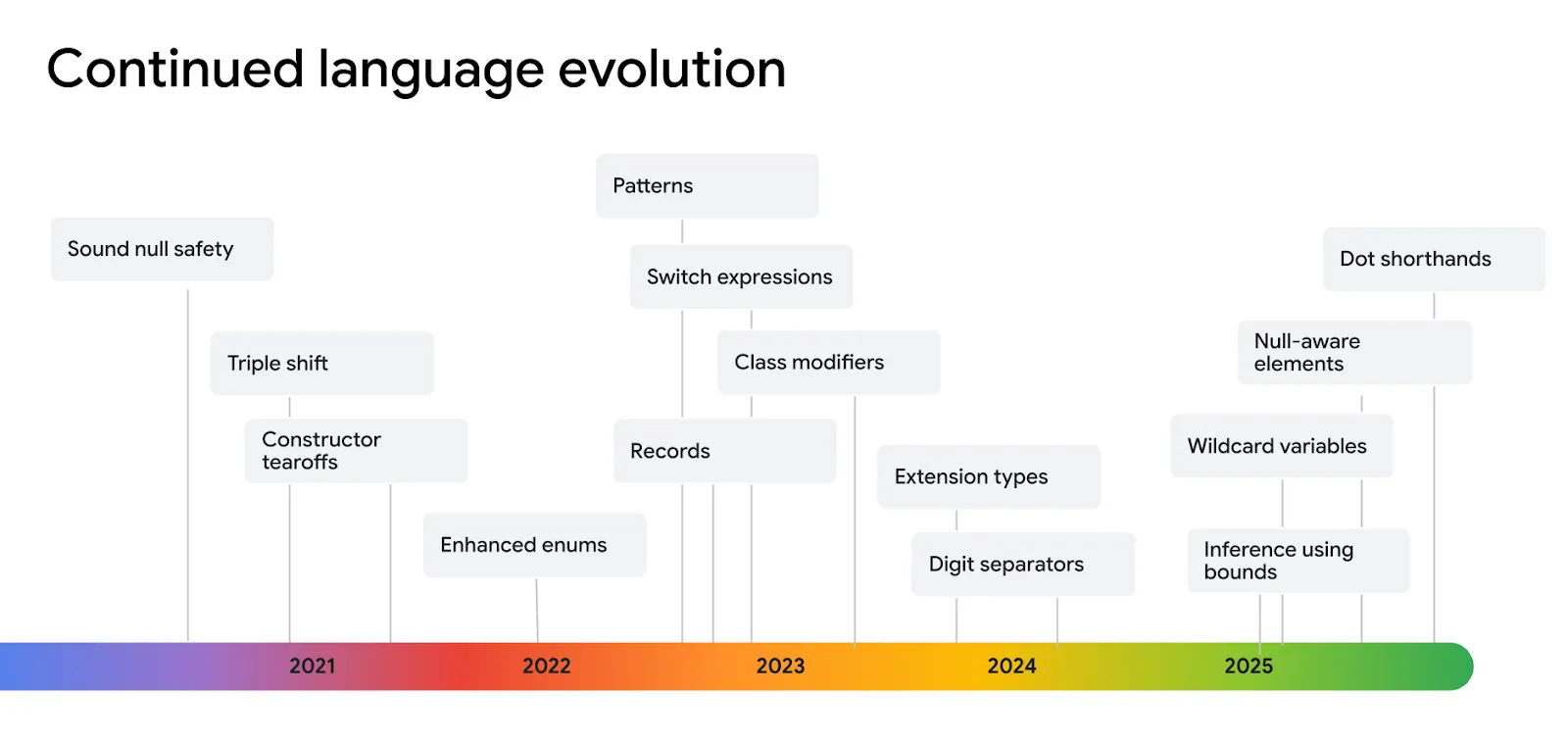
Dart code files have an extension of “.dart”, introduced in 2011 and got to v1.0 in 2013.
-
List past versions at:
https://dart.dev/resources/whats-new
-
Contributed code used for Google’s demos
https://github.com/flutter/demos
-
open source samples that illustrate best practices for Flutter
https://github.com/flutter/samples?tab=readme-ov-file
-
TODO: dart install tool.
-
Contents of /lib/main.dart from *
 // Importing important packages require to connect
 // Flutter and Dart
 import 'package:flutter/material.dart';

 // Main Function
 void main() {
 // Giving command to runApp() to run the app.

 // The purpose of the runApp() function is to attach
 // the given widget to the screen.
 runApp(const MyApp());
 }

 // MyApp extends StatelessWidget and overrides its
 // build method.
 class MyApp extends StatelessWidget {
 const MyApp({Key? key}) : super(key: key);

 // This widget is the root of your application.
 @override
 Widget build(BuildContext context) {
     return MaterialApp(

     // title of the application
     title: 'Hello World Demo Application',

     // theme of the widget
     theme: ThemeData(
         primarySwatch: Colors.lightGreen,
     ),

     // Inner UI of the application
     home: const MyHomePage(title: 'Home page'),
     );
 }
 }

 // This class is similar to MyApp instead it
 // returns Scaffold Widget
 class MyHomePage extends StatelessWidget {
 const MyHomePage({Key? key, required this.title}) : super(key: key);
 final String title;

 @override
 Widget build(BuildContext context) {
     return Scaffold(
     appBar: AppBar(
         title: Text(title),
         backgroundColor: Colors.green,
         foregroundColor: Colors.white,
     ),

     // Sets the content to the
     // center of the application page
     body: const Center(

         // Sets the content of the Application
         child: Text(
         'Welcome to Visual Studio Code!',
     )),
     );
 }
 }
Install for local Development on MacOS
https://docs.flutter.dev/get-started/custom#target-platform
- Install Homebrew for Mac
- Install git, XCode
- Install Flutter for CLI with brew install –cask flutter
- Install Visual Studio Code with extras for Flutter:
https://marketplace.visualstudio.com/items?itemName=Dart-Code.flutter
- Click “Install”.
Alternately:
- In Go to View > Command Palette or press Command + Shift + P.
-
In the command palette, type flutter.
- Select Flutter: New Project.
VS Code prompts you to locate the Flutter SDK on your computer. Select Download SDK.
-
When the Select Folder for Flutter SDK dialog displays, choose where you want to install Flutter.
-
Click Clone Flutter.
-
While downloading Flutter, VS Code displays this pop-up notification:
-
Downloading the Flutter SDK. This may take a few minutes. This download takes a few minutes. If you suspect that the download has hung, click Cancel then start the installation again.
-
Click Add SDK to PATH.
-
When successful, a notification displays: “The Flutter SDK was added to your PATH. VS Code might display a Google Analytics notice.” If you agree, click OK.
-
To ensure that Flutter is available in all terminals: Close all terminal windows. Then Quit and Restart VS Code.
- Verify installation: <pre>flutter –version</pre>
Flutter 3.38.2 • channel stable • https://github.com/flutter/flutter.git Framework • revision f5a8537f90 (15 hours ago) • 2025-11-18 09:27:21 -0500 Engine • hash 78c3c9557e50ee7c676fa37562558c59efd8406a (revision b5990e5ccc) (6 days ago) • 2025-11-12 21:08:24.000Z Tools • Dart 3.10.0 • DevTools 2.51.1 -
To support Flutter plugins that use native macOS code, install the latest version of https://cocoapods.org/, following the CocoaPods installation guide See https://flutter.dev/to/platform-plugins
sudo gem install cocoapods
Alternately, CocoaPods update guide.
[sudo] gem install cocoapods
- Run <pre>flutter doctor -v</pre>
[✗] Chrome - develop for the web (Cannot find Chrome executable at /Applications/Google Chrome.app/Contents/MacOS/Google Chrome) [7ms] ! Cannot find Chrome. Try setting CHROME_EXECUTABLE to a Chrome executable. -
Check for macOS devices to ensure Flutter can find and connect to your macOS device correctly, run flutter devices in your preferred terminal:
flutter devices
Create locally step-by-step
View Building your first Flutter App within https://codelabs.developers.google.com/?text=flutter with code at:
- Install VSCode & Flutter (above)
Testing mobile apps
-
Create an Android emulator, download Android Studio which also supports Flutter development, and follow the instructions in Create and manage virtual devices.
-
Create an iOS simulator, you will need a Mac environment. Download XCode, and follow the instructions in Simulator Overview > Use Simulator > Open and close a simulator.
-
TODO: dart build tool.
Agentic Vertex AI
-
https://blog.flutter.dev/learn-how-to-build-agentic-apps-with-flutter-angular-firebase-and-vertex-ai-ad46b38b1adb
-
https://flutter.dev/events/building-agentic-apps#home
-
MCP server?
SVG & Icon Fonts
.svg vector files look sharper and consume less space because they are treated like program code.
Search for images from stock photo sites:
- dribble.com
- pinterest.com
- Dart function declaration to let the LLM set colors in your app:
FunctionDeclaration get setColorFuncDecl => FunctionDeclaration(
  'set_color',
  'Set the color of the display square based on red, green, and blue values.',
  parameters: {
 'red': Schema.number(description: 'Red component value (0.0 - 1.0)'),
 'green': Schema.number(description: 'Green component value (0.0 - 1.0)'),
 'blue': Schema.number(description: 'Blue component value (0.0 - 1.0)'),
  },
);
Graphically Design using Figma
Generate from visual designs in $20+/mo Figma Design Desktop app based on templates from $16.50/mo Envato
About Figma Design to Design and prototype in one place.
Features
- User Authentication
- Billing
E-commerce
https://github.com/googlecodelabs shown using npm ployserve.
panoply store
UI Widgets
PROTIP: Split code into separate widget sections for faster performance.
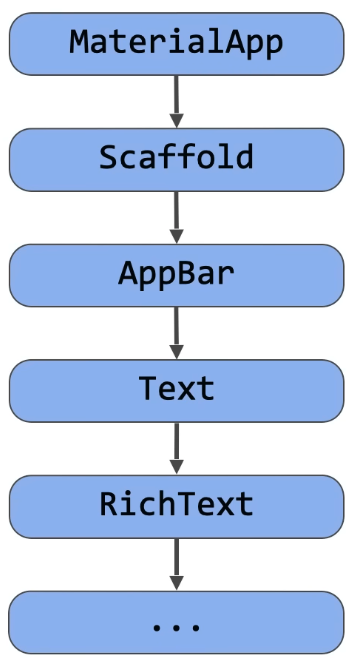
Google Material Design and Cupertino support Flutter’s wide range of widgets.
-
YouTube Live: Building scrolling experiences in Flutter | Workshop
-
Building next generation UIs in Flutter - animations, shaders, and particle effects that work across all of Flutter’s six platforms.
Smart Phone app features
animations and transitions to make apps visually stunning.
Utilize device features such as the camera within your applications.
Mastering Emulators in VS Code & Android Studio (Google Fold Pro & Pro Tips!) (virtual devices)
Zoho Tables mobile apps are built using Flutter and has a million lines of code. All state management is done using BLoC, ValueNotifier, ValueListenableBuilder.
Database
https://github.com/amugofjava/anytime_podcast_player uses Sembast, a NoSQL in-memory database but less suitable for a larger, more data-centric app.
Web apps
Flutter’s Skia rendering engine runs 60 frames per second for visually stunning and responsive user interfaces.
Taking Flutter to the Web By Damodar Lohani
Calls to APIs
Third-party integrations include cloud hosting, data storage, payment gateways, and SMS push notifications.
AI tools: Google Gemini, OpenAI (ChatGPT), Anthropic
Google’s Firebase Backend
-
Google Project Account to set up Firebase account.
-
Get on the FireBase Console at:
-
Build a Gemini powered Flutter app generates random, cool-sounding names. April 17, 2025 with Craig Labenz and Andrew Brogdon of DevRel. This use Asynchronous programming - Futures, async/await, and streams. Interprets the descriptions into precise RGB color values Displays the color on screen in real-time Provides technical color details and interesting context about the color Maintains a history of recently generated colors
- Project setup - You’ll start with a basic Flutter app structure and the colorist_ui package
- Basic Gemini integration - Connect your app to Firebase AI Logic and implement LLM communication
- Effective prompting - Create a system prompt that guides the LLM to understand color descriptions
- Function declarations - Define tools that the LLM can use to set colors in your application
- Tool handling - Process function calls from the LLM and connect them to your app’s state
- Streaming responses - Enhance the user experience with real-time streaming LLM responses
-
LLM Context Synchronization - Create a cohesive experience by informing the LLM of user actions
- Configure Firebase AI Logic for Flutter applications
- Craft effective system prompts to guide LLM behavior
- Implement function declarations that bridge natural language and app features
- Process streaming responses for a responsive user experience
- Synchronize state between UI events and the LLM
- Manage LLM conversation state using Riverpod
- Handle errors gracefully in LLM-powered applications
-
Generate random dishes to cook and eat based on user criteria.
-
Local development for your Flutter apps using the Firebase Emulator Suite
-
Send and receive notifications for a Flutter app using Firebase Cloud Messaging
Resources
Jobs
https://www.virtualemployee.com/da/hire-flutter-app-developers/