

Get full visibility and versioning of models, their metadata, and compare metrics from runs.







Overview
- Why MLflow? Run Metadata and Metrics
- Competition to MLflow
- MLflow Components
- End-to-end capabilities Flowchart
- Two sided product
- Docker Compose
- Manual Install locally
- Download and Start Server
- IDE
- Custom MLflow Extensions
- GitHub repos
- Python Libraries
- Scoring Guidelines in Python
- MLflow activation in Python
- MLFlow workflows
- Aliases
- Compare metrics from selected experiments
- Dagshub
- References:
Why MLflow? Run Metadata and Metrics
Machine Learning (ML) engineers not using MLflow need to track their run metadata perhaps using a spreadsheet such as this:
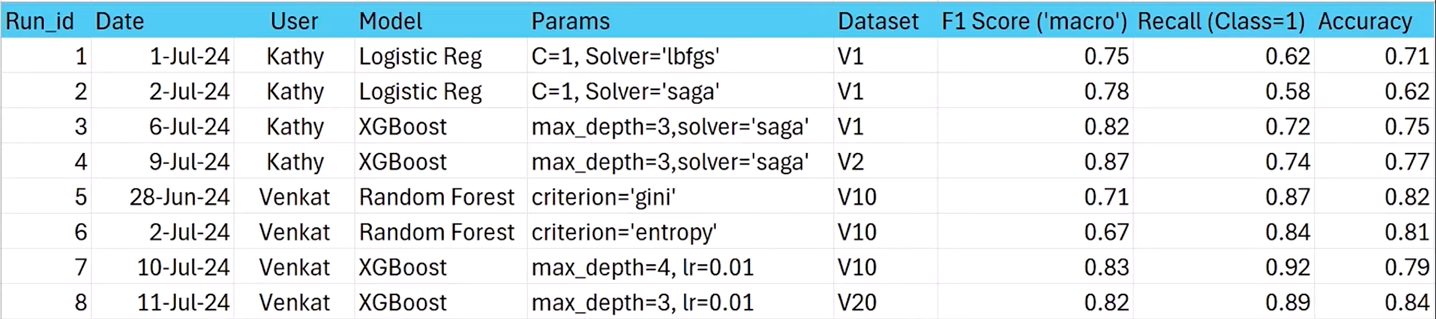
Metadata about runs include: Run ID, Run Start/End time, User, Model type, Parameters, Dataset version, etc.
Run metrics include: F Score, Precision, Recall, Accuracy.
The above doesn’t provide versioning and is a clumsy way to share data.
MLflow provides a GUI to share and visualize data many different ways.
Competition to MLflow
Kubeflow is run within Kubernetes.
NVIDIA’s reinforcement learning environments (NeMo Gym and NeMo RL) run with https://lmstudio.ai to run LLMs privately (like Hugging Face).
LangSmith:
- Debugging
- Playground
- Prompt Management
- Annotation
- Testing
- Monitoring
Airflow focuses on using a DAG (Directed Asysclic Graph, like GitHub uses) to version data changes.
MLflow Components
MLflow provides “Enterprise worthy” features in each of its “pluggable” components:
The menu that appears lists the data artifacts MLflow works with:
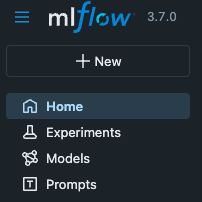
- Experiments are run based on input prompts (referencing tags)
- Models are artifacts (e.g. a pickled scikit-learn model)
- Prompts are store in a backend SQL store
Architecture:
- Backend SQL Store to store metadata about runs, models, traces, and experiments
- (Binary object file) Artifact store
- Tracking UI Server
Backend SQL Store
Run metrics (such as model parameters, tags, and metadata from experiments (logs, traces, metrics) are streamed into a Backend Store. This is typically a relational (SQL) database.
“managed cloud services” from cloud vendors provide enterprises the fine-grained user and network access controls they need.
- Databricks
- AWS Sagemaker
- Azure Machine Learning
- GCP (GKE)
- Nebius
MLflow software managing the MLflow Backend Store makes use of SQLAlchemy Engine library</a> which implements OS environment variables controlling SQLAlchemy’s QuePool connection pooling options referenced to manage a pool of long running database connections in memory for efficient re-use:
| OS System Environment Variable | SQLAlchemy QueuePool option | Default |
| MLFLOW_SQLALCHEMYSTORE_POOL_SIZE | pool_size | 5 |
| MLFLOW_SQLALCHEMYSTORE_MAX_OVERFLOW | max_overflow | 10 |
| MLFLOW_SQLALCHEMYSTORE_POOL_RECYCLE | pool_recycle | True |
These setting can be instantiated with the sqlachemy engine:
engine = create_engine(
    config.SQLALCHEMY_DATABASE_URI, pool_pre_ping=True, pool_size=32, max_overflow=64
)
“pool size” is the total number of concurrent DBAPI connections an application may use simultaneously.
BLOG: CAUTION: Default values mean that a timout occurs when more than 15 connections are opened at the same time (with 5 of them staying idle when not in use, and 10 of them being discarded when released).
PROTIP: Ongoing monitoring of resource usage (such as slowlog) is needed for algorithms (such as gunicorn) to recognize when settings need to be reconfigured to adequately handle actual average and peak loads.
A connection pool shared among several modern (WSGI) web servers (which use multiple threads and/or processes for better performance) need subtle but fundamental configurations that can lead to very bad and difficult to diagnose production errors:
- WSGI servers are created before the worker processes are forked.
- Several processes will use the same connection concurrently, and the reponses could get mixed up.
- One process will close the connection, and the other will try to use it, leading to an exception raised.
Enterprise MLflow on Databricks UnityDB
For example, when MLflow runs on a Databricks’ “Unity” database in the cloud, Databricks’ “Lakehouse” architecture holds multiple versions of the same data to enable “fall back” to the state of the whole database at previous points in time.
https://www.mlflow.org/docs/latest/self-hosting/architecture/overview/
One can start with a single host mode with SQLite backend and local file system for storing artifacts. To scale up, you can switch backend store to PostgreSQL cluster and point artifact store to cloud storage such as S3, GCS, or Azure Blob Storage.
MLflow Artifact store
MLflow objects (binary-format files) containing model weights, container images (.png files), etc. are housed in an Artifact Store.
The legacy default was storing those artifacts in a local folder path specified one of two ways:
* MLFLOW_TRACKING_URI=”./mlruns” is set in CLI or
* --backend-store-uri ./mlruns in CLI parameters when starting the server.
Path: mlflow-artifacts:/…
For Logistic Regression:
- MLmodel (Parquet file)
- conda.yaml (if you’re using Conda environment)
- model.pkl (“pikle” files containing Scikit-learn model data)
- python_env.yaml
- requirements.txt
Software such as min.io AIStor (Object store) located by the value of MLFLOW_S3_ENDPOINT_URL) manages artifacts as file storage types:
* NFS (Network File System) such as mount point <tt>/mnt/nfs</tt>
* Amazon S3 at MLFLOW_S3_ENDPOINT_URL
* Azure Blob Storage,
* Google Cloud Storage,
* SFTP server,
<br /><br />
A separate Bash CLI script needs to be secured to contain secret keys defined such as this OS system variable to use stronger KMS keys (which cost more) on AWS S3:
export MLFLOW_S3_UPLOAD_EXTRA_ARGS=’{“ServerSideEncryption”: “aws:kms”, “SSEKMSKeyId”: “1234…”}’
Tracking UI Server
Tracking Server is the lightweight FastAPI server that serves the MLflow UI and API.
-
Click “Open Source” under “Model Training” at:
https://www.mlflow.org/docs/latest/ml/
(Classic/Traditional Machine Learning) Model Training which create LLMs. MLflow helps with management of tuning hyperperameters and analyzing result metrics from various experiments during the whole lifecycle of machine learning projects.
- https://docs.databricks.com/aws/en/mlflow/
-
https://docs.databricks.com/aws/en/getting-started/free-edition
- VIDEO: Databricks’ MLflow 3 product managers Eric Peter and Corey Zumar Nov 7, 2025.
End-to-end capabilities Flowchart
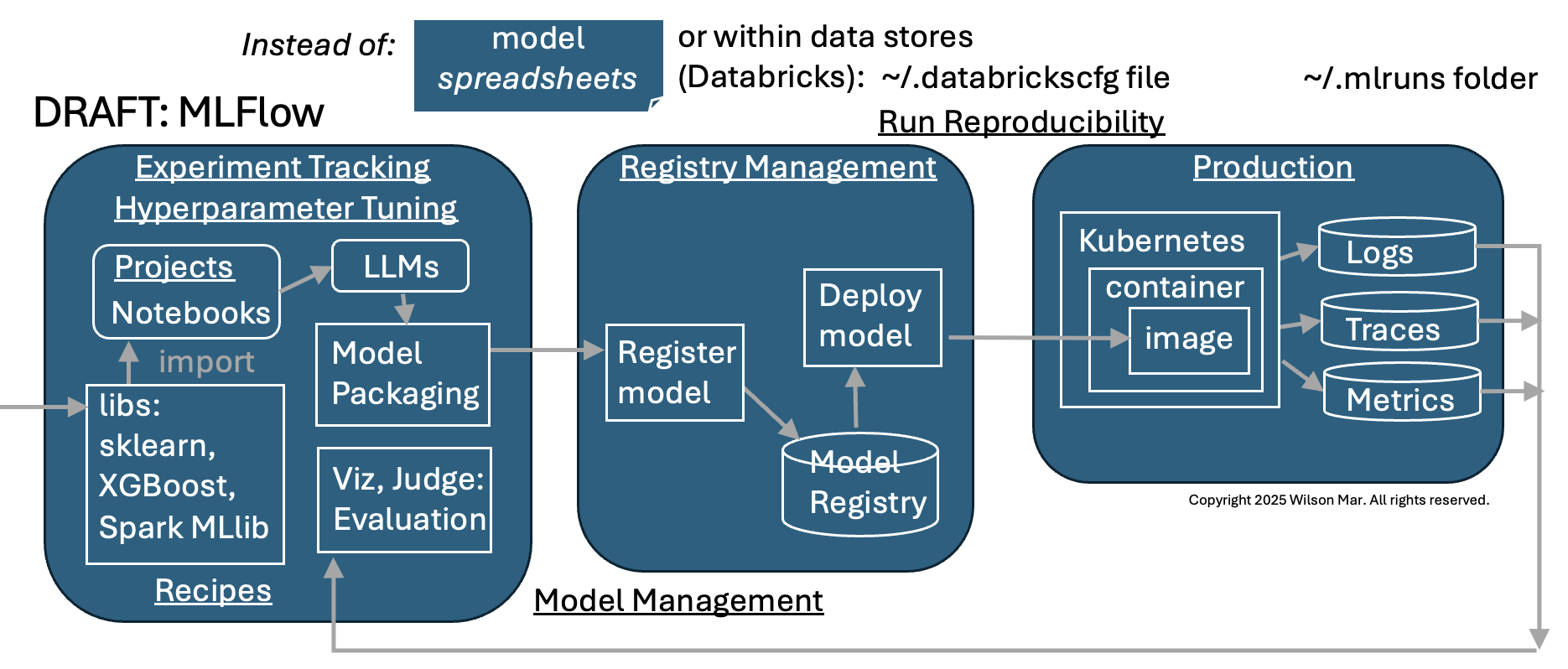
TODO: Text
Two sided product
Our question about MLFlow’s “Open Source” editions: can it be used by cheap students to evaluate my own AI prompts. Examples here run on the default SQLite database setup on my macOS laptop or self-host on servers.
-
In an internet browser, visit where MLflow is open-sourced:
https://github.com/mlflow/mlflow
“The open source developer platform to build AI agents and models with confidence. Enhance your AI applications with end-to-end tracking, observability, and evaluations, all in one integrated platform.”
“MLflow is the only platform that provides a unified solution for all your AI/ML needs, including LLMs, Agents, Deep Learning, and traditional machine learning.”
-
Visit the MLflow marketing website:
Notice there are two sides to the MLflow product:
A. Classic/Traditional Machine Learning Model Training runs which create LLMs used to respond to prompts.
B. New GenAI Apps & Agents to evaluate and optimize AI applications and agentic workflows of prompts which use LLMs to plan actions and call APIs.
Either way, MLflow’s “end-to-end” capabilities led to make it the most popular framework enterprises use for “industrial scale” operation and governance in the lifecycle of LLM creation and usage (from dev to production use).
-
Visit MLflow’s Docs website:
https://www.mlflow.org/docs/latest/index.html
Notice that to each side there is an “Open Source” option and “MLflow on Databricks” option.
Docker Compose
All components can be setup using a single docker compose CLI command which instantiates 3 docker containers:
A. MLflow
B. MinIO artifact (object) server (port 9000)
C. MySQL backend on port 5000
-
TODO:
based on https://github.com/sachua/mlflow-docker-compose
Manual Install locally
PROTIP: Using uv rather than pip:
- Python
python --version - Ensure you have the latest uv utilities installed, including the
global uv configuration directory ~/.config/uv/ and uv.toml file:
uv config --show
uv --version
uv 0.9.13 (Homebrew 2025-11-26)
- PROTIP: Create a folder to receive files, populate with .git folder, .gitignore, pyproject.toml, README.md, .python-version
uv init mlflow1 cd mlflow1 - PROTIP: To install MLflow as a CLI tool (instead of using pip):
pipx install mlflow
mlflow --version
mlflow, version 3.7.0
Databricks reports 5,000 users.
-
NOTE: MLflow describes its releases at: https://github.com/mlflow/mlflow/releases
Vulnerability Scans
- PROTIP: Scan for vulnerabilities:
pipx runpip mlflow list --format=freeze | safety scan --stdin - Research CVEs found, such as:
The safety scan found 8 HIGH severity vulnerabilities (CVSS 8.8) in MLflow 3.7.0, all related to deserialization issues in various ML model formats:

•  CVE-2024-37057: TensorFlow models
•  CVE-2024-37055: pmdarima models
•  CVE-2024-37053 & CVE-2024-37052: scikit-learn models
•  CVE-2024-37054: PyFunc models
•  CVE-2024-37056: LightGBM scikit-learn models
•  CVE-2024-37059: PyTorch models
•  CVE-2024-37060: Recipes

No known fixes are available yet for these vulnerabilities. These are deserialization vulnerabilities that could potentially allow arbitrary code execution when loading untrusted model files. If you're working with models from untrusted sources, exercise caution until patches are released.
- CAUTION: Raise security issues securely. Instead of detailing specifics about security issues in public, follow the procedure in their SECURITY.md (email).
Download and Start Server
- Download modules for server:
mlflow uiWithout configuration means these warning message appear:
Backend store URI not provided. Using sqlite:///mlflow.db
Registry store URI not provided. Using backend store URI.
Look for:
INFO:     Uvicorn running on http://127.0.0.1:5000 (Press CTRL+C to quit)
...
INFO:     Application startup complete.
Start MLflow
- Optionally: Open another CLI Terminal window and:
mlflow server --port 5000 - Open your default browser:
open http://127.0.0.1:5000IDE
- VSCode vs. PyCharm vs.
- AI browsers Comet, etc.
Custom MLflow Extensions
To extend MLflow’s core with new flavors, UI tabs, or artifact stores, build custom functionality, see Write & Use MLflow Plugins. It shows how to package your plugin, register it, and test it locally before pushing to production.
in Python, Java, R, CLI, and REST API Example
GitHub repos
Spam Classification, Time Series Analysis, Text Classification using Random Forest, Deep Learning
MLproject file
https://github.com/mlflow/mlflow-example/blob/master/MLproject
name: tutorial
conda_env: conda.yaml
entry_points:
main:
    parameters:
    alpha: {type: float, default: 0.5}
    l1_ratio: {type: float, default: 0.1}
    command: "python train.py {alpha} {l1_ratio}"
MLflow’s Sample Python code
https://github.com/mlflow/mlflow-example wine quality. Uses Conda.
Sample_ML_model.py
https://github.com/c17hawke/mlflow-introduction/blob/main/mlflow-codebase/simple-ML-model/simple_ML_model.py
Azure Sample GenAI Python code
https://github.com/Azure-Samples/azure-databricks-mlops-mlflow Azure Databricks MLOps sample for Python based source code using MLflow without using MLflow Project.
Python Libraries
-
Python –version
-
mlflow, etc. in requirements.txt
- Although the Conda library is not secure for having too many modules that can go rogue, create and activate the conda environment:
conda create --prefix ./env python=3.12 -y conda actiavate ./env -
Although not scalable, install pandas for dataframe handling:
Scoring Guidelines in Python
import mlflow
from mlflow.genai.scores import Guidelines
custom_guidelines = [{
    "name" : "accuracy",
    "guideline": """The response correctly references ...
    ...
    "name" : "personalized",
    ...
    ]
custom_scorers = [{
    Guidelines(name=g["name"], guidelines=g["guideline"])
    for g in custom_guidelines  # above.
MLflow activation in Python
- Add these lines of Python code to activate MLflow instrumentation:
 from openai import OpenAI
 mlflow.openai.autolog()
MLFlow workflows
- Log traces
- Train models
- Run evaluation
- Register prompts
Aliases
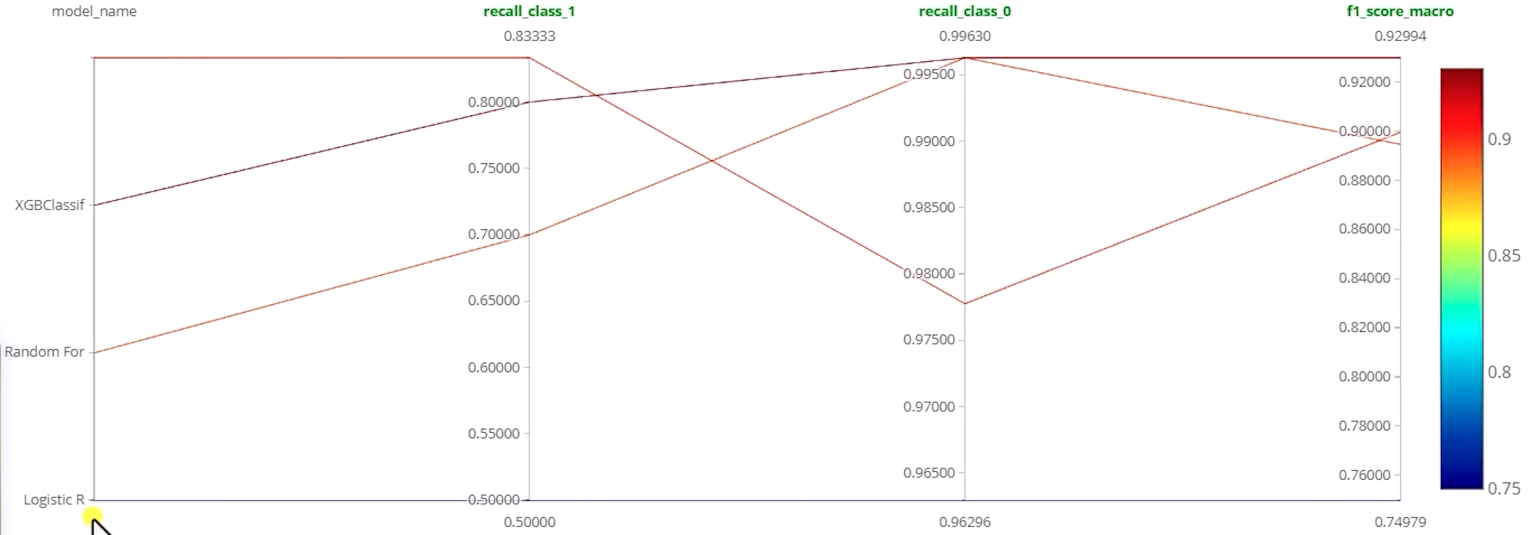
Aliases can be associated with specific runs, such as “@Challenger”.
Metrics for each experiment:
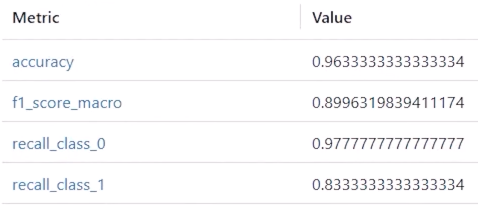
recall_class_0 ???
recall_class_1 ???
Metrics Classification Report
A sample print(classifaction_report(y_test, y_pred_xgb) after an experiment run yields:
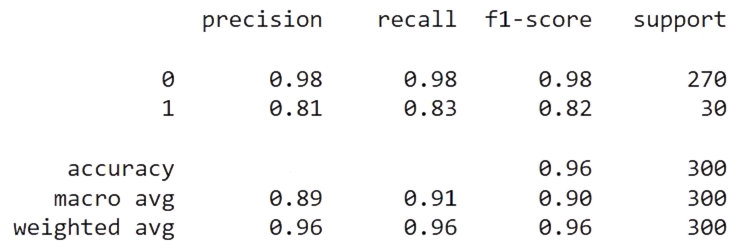
Adapted from https://scikit-learn.org/stable/modules/generated/sklearn.metrics.classification_report.html#sklearn.metrics.classification_report
Among Per-Class Metrics:
Precision: Of all instances the model predicted as a given class, what percentage were actually that class? Intuitively, precision is the ability of the classifier not to label as positive a sample that is negative.
- Class 0: Precision 0.98 means that when the model predicts 0, it is correct 98% of the time.
- Class 1: 81% of predicted 1s were correct
Recall: Of all actual instances of a given class, what percentage did the model correctly identify? Recall is the ability of the classifier to find all the positive samples.
- Class 0: Recall 0.98 means it finds 98% of all true 0’s.
- Class 1: 83% of actual 1s were found
F1-score: The weighted harmonic mean of precision and recall, balancing both metrics:
- Class 0: 0.98 (excellent)
- Class 1: 0.82 (good)
Support: The count of actual instances of each class in the dataset:
- Class 0: 270 instances (90% of data)
- Class 1: 30 instances (10% of data)
The model performs better on class 0 than class 1, which is common when there’s class imbalance (270 vs 30 samples). The weighted average of 0.96 is closer to class 0’s performance because that class dominates the dataset.
Among Aggregate Metrics near the bottom:
Accuracy: Overall correctness across all predictions = F1 score of 96%
Macro avg: Simple average of metrics across classes (treats each class equally).
Doesn’t account for class imbalance
Weighted avg: Average weighted by support (accounts for class imbalance).
More representative of overall performance given the 270:30 class distribution.
Compare metrics from selected experiments
Dagshub
https://github.com/code/mlflow_dagshub_demo
References:
[1] VIDEO by codebasics.io who offers a class.
https://mlflow.github.io/mlflow-website/blog/deep-learning-part-2/ Deep Learning with MLflow (Part 2) uses dataset https://huggingface.co/datasets/coastalcph/lex_glue/viewer/unfair_tos
https://medium.com/@mohsenim/tracking-machine-learning-experiments-with-mlflow-and-dockerizing-trained-models-germany-car-price-e539303b6f97 Tracking Machine Learning Experiments with MLflow and Dockerizing Trained Models: Germany Car Price Prediction Case Study
https://aws.amazon.com/blogs/machine-learning/securing-mlflow-in-aws-fine-grained-access-control-with-aws-native-services/
https://mlflow.org/docs/latest/ml/tracking/tutorials/remote-server Remote Experiment Tracking with MLflow Tracking Server
https://viso.ai/deep-learning/mlflow-machine-learning-experimentation/ MLflow: Simplifying Machine Learning Experimentation
https://arxiv.org/pdf/2202.10169 MACHINE LEARNING OPERATIONS: A SURVEY ON MLOPS TOOL SUPPORT by Nipuni Hewage and Dulani Meedeniya
https://learning.oreilly.com/library/view/-/9781098179625/”>BOOK: “Data Governance with Unity Catalog on Databricks” September 2025</a> By Kiran Sreekumar and Karthik Subbarao
https://www.linkedin.com/in/jun-shan-8332221/”> Jun Shan
25-12-18 v014 + SQLAlchemy :2025-01-16-mlflow.md created 2025-01-16